
LLM SSE Events
This walkthrough mirrors the seeded Mock LLM project. It shows how to model both standard JSON completions and streaming completions over Server-Sent Events.
What you are building
The finished project contains:
POST /v1/chat/completionsPOST /v1/chat/completions/stream
And one project constant:
constants.expected_api_key = sk-synth-123451. Add the non-streaming completions API
Create POST /v1/chat/completions with three responses:
UnauthorizedInvalid ParametersSuccessful Completionas the default
Use Unauthorized to reject requests where {{request.headers.x-api-key}} does not equal {{constants.expected_api_key}}.
Use Invalid Parameters to reject requests where:
{{request.body.value.model}}is empty{{request.body.value.messages}}is an empty array
Keep Successful Completion as the default 200 response that returns a JSON completion payload.
2. Add the streaming completions API
Create POST /v1/chat/completions/stream with three responses:
UnauthorizedInvalid ParametersText generation streamas the default
The first two branches follow the same pattern as the non-streaming API. The difference is the default response.
3. Configure the SSE response
Set the default response to:
- status
200 content-type: text/event-streamcache-control: no-cache- body type
sse - SSE mode
events
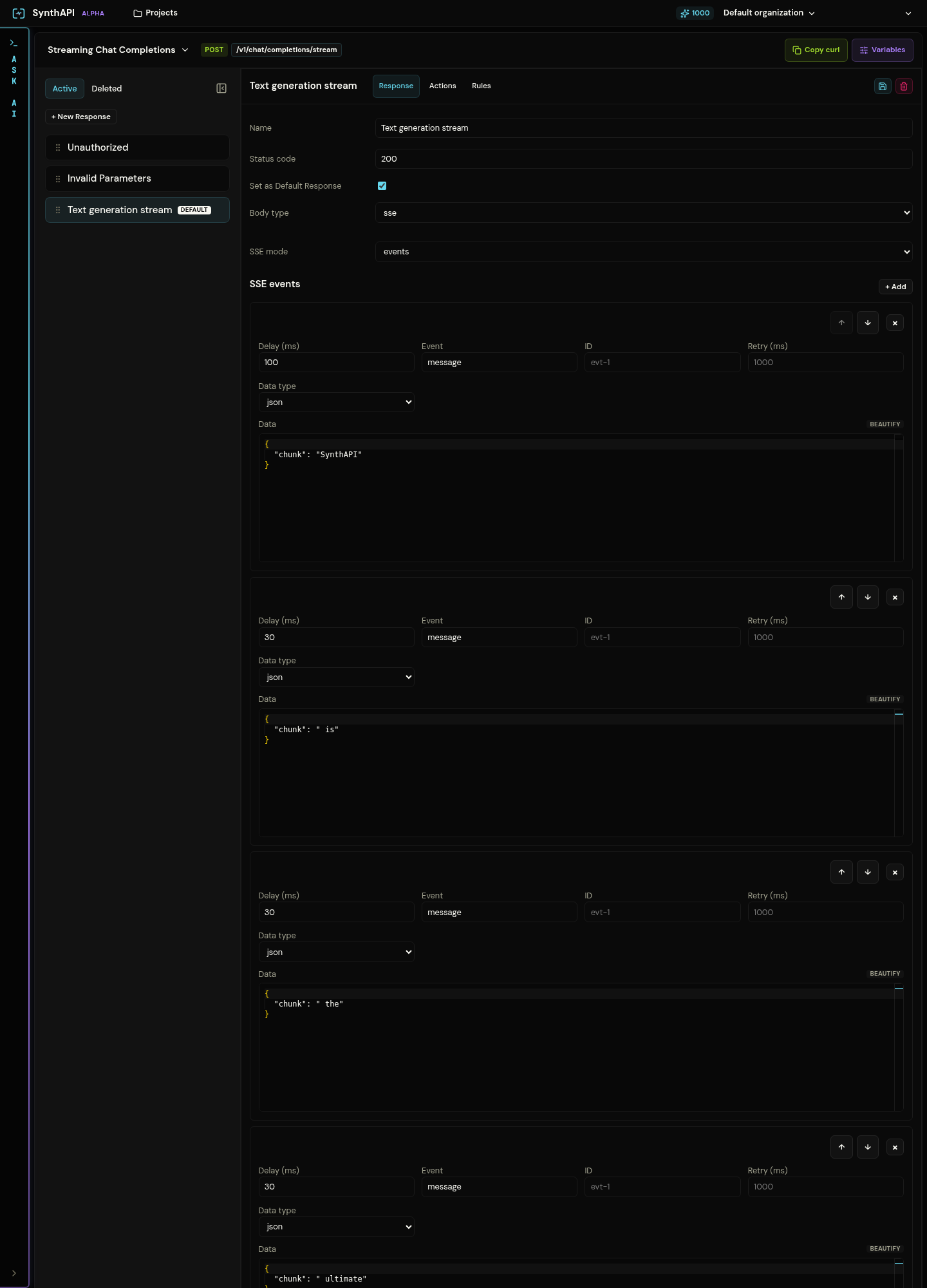
Each event represents one chunk in the output stream. The seeded example uses:
- an initial event with a slightly larger delay
- many
messageevents carrying chunk JSON - a final
doneevent carrying completion metadata
This produces a stream that feels like token-by-token or word-by-word model output.
4. Why the response ordering matters
Keep the responses ordered as:
UnauthorizedInvalid ParametersText generation stream
That ensures auth and validation failures terminate the request before the stream starts. Once the stream response matches, it becomes the fallback happy path for valid requests.
5. Test the non-streaming endpoint
Replace <project-slug> with your mock project slug.
curl -i \
  -H "x-api-key: sk-synth-12345" \
  -H "Content-Type: application/json" \
  -d '{"model":"gpt-4o-mini","messages":[{"role":"user","content":"Hello"}]}' \
  https://synthapi.dev/mock/<project-slug>/v1/chat/completions
This should return a JSON completion.
6. Test the streaming endpoint
Use curl -N so the output is printed as the events arrive.
curl -N \
  -H "x-api-key: sk-synth-12345" \
  -H "Content-Type: application/json" \
  -d '{"model":"gpt-4o-mini","temperature":0.7}' \
  https://synthapi.dev/mock/<project-slug>/v1/chat/completions/stream
You should see multiple SSE events followed by a final done event.
What to verify
- invalid API keys return
401before any streaming logic begins - invalid parameters return
400 - valid requests receive
text/event-stream - event ordering and delays produce a readable incremental stream